ELD · DVIR for fleets
DVIR on the driver's phone Repairs signed off in the portal
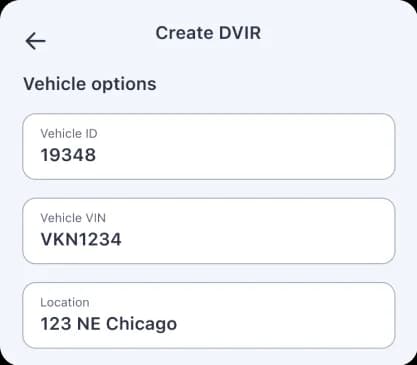
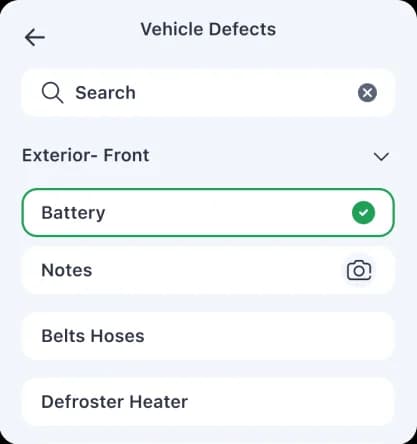
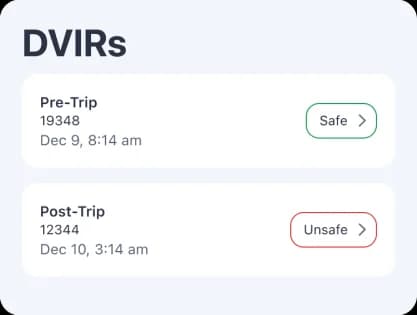
With two or more trucks, each one needs a driver vehicle inspection report when a defect turns up. In the Route One ELD app the driver goes through a checklist of about 55 items, adds walkaround photos and marks the truck Safe or Unsafe. You see it in the Fleet Portal and certify the repair with your signature.
- Reports in the free ELD plan
- No card, no contract
- Sign up in under 10 minutes
Get the driver app


Try it
Walk one inspection from the cab to the sign-off
Mark a defect on the phone, submit the report, then resolve it the way a fleet manager does in the portal.
- Mark a defect
- Submit the report
- 3Resolve and sign
Driver app
Truck 2210
Tap Safe or Unsafe on a part that has a defect.
- Service brakes
- Parking brake
- Steering mechanism
- Lighting devices and reflectors
- Tires
- Horn
- Windshield wipers
- Rear vision mirrors
- Coupling devices
- Wheels and rims
- Emergency equipment
Fleet Portal
Truck 2210
- Unsafe
Service brakes
Photo added
- Safe
Lighting devices and reflectors
Photo added
An illustration of the flow with the 11 parts the federal rule names. The checklist in the app has about 55 items, and the screens look different.
DVIR is one part of Route One ELD. See what else the ELD does
Why it matters
What a missing DVIR can cost
$1,584 a day
Recordkeeping penalty
The maximum civil penalty for failing to prepare or keep a required record, for each day the violation continues, up to $15,846.
Critical
Counts against your safety rating
Failing to require drivers to prepare a DVIR is on FMCSA's list of critical regulations used to set a carrier's safety rating.
Acute
Driving before the repair
Operating a vehicle before an out-of-service defect listed on a DVIR is corrected is an acute violation: one severe enough to require immediate corrective action.
Source: 49 CFR Part 386, Appendix B, and Part 385, Appendix B. Penalty amounts as of November 2026.
How it works
From inspection to a certified repair
The driver inspects the truck
Pre-trip and post-trip reports are completed in the Route One ELD driver app, on the same phone as the logs.
Defects are marked, with photos
Odometer, walkaround photos and a checklist of about 55 items. The report ends with a result: Safe or Unsafe.
The report reaches the Fleet Portal
Reports appear in the DVIR list once the driver submits. Filter by Safe, Unsafe or by date.
You certify the repair
Close a defect as Repaired or No repairs needed, add the date and sign. The portal records who resolved it.
After the report
A reported defect lands in Maintenance
The report is only half of the job. In the Fleet Portal every defect from a DVIR goes to the vehicle it belongs to and stays open until someone resolves it.
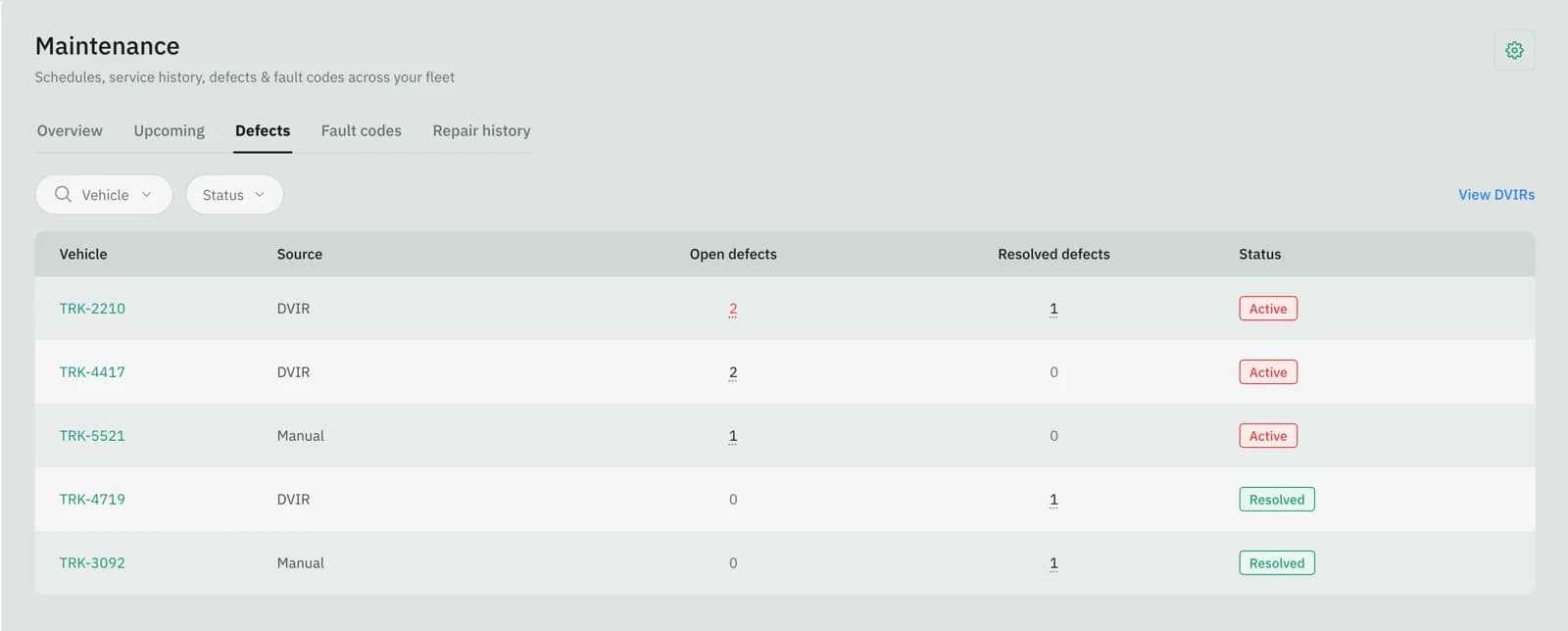
Open defects, vehicle by vehicle
The Defects tab counts open and resolved defects for each truck and shows which ones are still active.
Resolved with a signature
Close one defect or several at once with a date, an outcome and a drawn signature. The portal keeps the name of the person who signed.
The repair goes on record
Log the work in Repair history with parts, labor and the shop, next to the truck's service schedule and engine fault codes.
The rule
What FMCSA asks for in a DVIR
The federal rule covers the report, the repair and how long you keep both.
Parts the report has to cover
- Service brakes, including trailer brake connections
- Parking brake
- Steering mechanism
- Lighting devices and reflectors
- Tires
- Horn
- Windshield wipers
- Rear vision mirrors
- Coupling devices
- Wheels and rims
- Emergency equipment
When a report is needed
At the end of each day's work, for each vehicle driven. A property carrier's driver doesn't have to write one when no defect was found.
Repair before the next trip
A defect likely to affect safe operation has to be repaired before the vehicle is driven again.
The carrier certifies
The carrier or its agent certifies on the report that the defect was repaired or that repair is unnecessary.
The next driver reviews
Before driving, the driver reviews the last report and signs that the repairs were certified.
Kept for three months
The report, the repair certification and the driver's review stay on file for three months.
Electronic is allowed
The report may be created and kept in electronic format.
The report rule doesn't apply to a carrier operating only one commercial motor vehicle, to driveaway-towaway operations or to a private, nonbusiness carrier of passengers. With two or more commercial vehicles, the rule covers each of them.
Source: 49 CFR 396.11 and 396.13, Federal Motor Carrier Safety Regulations.
Paper or app
A paper DVIR book vs the app
| What changes | Paper book | Route One ELD |
|---|---|---|
| Where the report is | In the cab until someone brings it in | In the Fleet Portal once submitted |
| Showing the defect | A written line | A checklist item, walkaround photos and a Safe or Unsafe result |
| Finding unsafe trucks | Read every page | Filter the list by Unsafe |
| Repair sign-off | A signature on the page | Date, outcome and signature saved with the defect |
| History of a truck | A stack of books | Open and resolved defects listed per vehicle |
Plans
Start with reports for free. Add signed repairs with Basic.
DVIR reports
Free plan
$0/mo
- Pre-trip and post-trip DVIRs in the app
- Odometer, walkaround photos, about 55 checklist items
- Reports in the Fleet Portal, filtered by Safe or Unsafe
- HOS logs and DOT inspection mode
Needs a compatible ELD device (IOSiX or PT-30). No card, no contract.
Signed repairs
Basic
$7.99/truck/mo, billed yearly
- Everything in Free
- Defects listed per vehicle in Maintenance
- Resolve with a date, an outcome and a signature
- Preventive schedules, repair history and engine fault codes
- IFTA mileage report
Or $9.99/truck/mo, month to month.
Device included
ELD + 1 year
$180one payment
- IOSiX ELD device
- A full year of the Basic plan
- 30-day money-back guarantee
Shipping is extra.
Quick answers
DVIR questions
What is a DVIR?
A driver vehicle inspection report. The driver records defects found on the vehicle, the carrier repairs what affects safety and certifies the repair, and the report is kept on file.
Does a driver have to fill out a DVIR every day?
The inspection is daily, at the end of each day's work on each vehicle. Under 49 CFR 396.11, a driver doesn't have to prepare a report when no defect or deficiency was found. Carriers of passengers follow their own rule.
Is an electronic DVIR legal?
Yes. 49 CFR 396.11 and 396.13 both say the report may be created and kept in electronic format.
How long do DVIRs have to be kept?
Three months from the date the report was prepared, together with the certification of repairs and of the driver's review.
Do I need DVIRs with one truck?
The report rule in 49 CFR 396.11 doesn't apply to a motor carrier operating only one commercial motor vehicle. The driver still has to be satisfied the vehicle is safe before driving it.
Is DVIR included in the free ELD plan?
Yes. Drivers complete DVIRs in the app and the reports appear in the Fleet Portal on every plan, the free one included. The Maintenance section, where defects are resolved and signed, comes with a paid ELD, GPS or dash cam plan.
Can the driver add a photo of the defect?
Yes. A DVIR in the app takes the odometer, walkaround photos, a checklist of about 55 items and a Safe or Unsafe result. The photo travels with the defect to the Fleet Portal.
Who signs off a repair?
A Fleet Portal user. Resolving a defect takes a date, an outcome (Repaired or No repairs needed) and a drawn signature, and the portal records the name of the person who resolved it.
Start with the free plan
Put your DVIRs in the driver app
Sign up in under 10 minutes, add a truck and a driver, and the next inspection is on the phone.